Building a Game Resources Manager with Web Tools
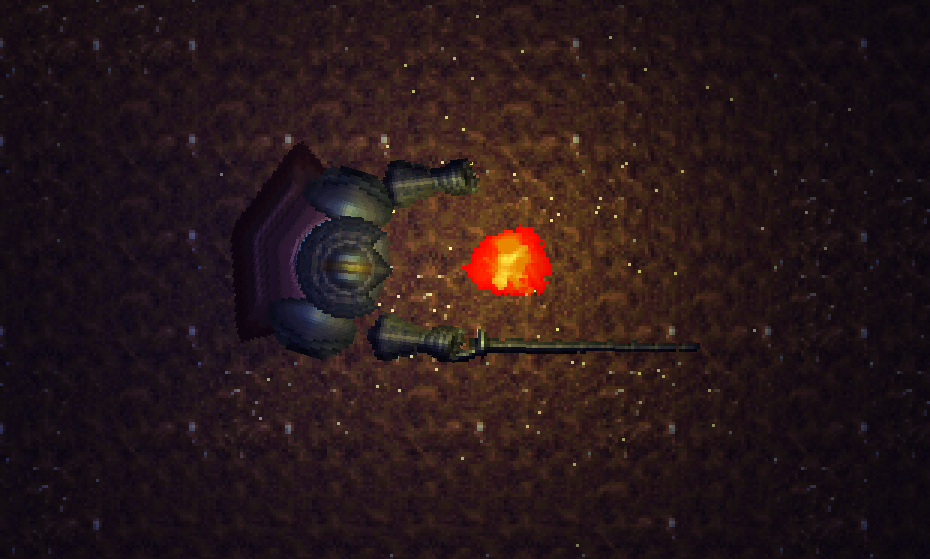
The Challenge
When building a game, managing data (items, NPCs, abilities, and their relationships) across JSON configuration files requires keeping track of IDs and validating their connections. Without a centralised tool, IDs drift between files, relationships break silently, and iteration becomes error-prone.
The real problem: choosing which editor binding requires the least effort to integrate with your existing workflow.
Instead of picking a particular solution, I decided to use tools I already knew well: Astro and Keystatic. This case study walks through why and what I built in a single day.
What is a Resource?
A Resource is simply a data container that holds game information without lifecycle methods. It contains item definitions, NPC stats, ability data, or any serialisable game information. The key is that it's pure data: no behaviour, just structure.
Game engines like Godot, Unity, and Unreal Engine have first-class Resource types because managing data separately from logic is essential in games.
In web development, the closest analogy is a state management store like Zustand - a single source of truth file with initial data that any part of the application can reference.
Why Web Tools?
My project stack was C++, entt, and SFML. These are lightweight libraries that don't provide built-in resource editors.
I considered two approaches:
- Engine bindings (Godot, Unity): They provide editors out of the box, but require learning new scripting, resource formats, and transformation logic back to C++.
- Web tools: I already know Astro, Keystatic, and JSON format. Zero learning overhead for new frameworks.
The real decision: which approach requires the least ecosystem commitment and provide most value to progress on learning?
I already work with JSON format daily and know React and TypeScript. Instead of learning a new engine's ecosystem (Godot, Unity, Bevy, etc.), I leveraged what I already had: web development tools.
Key advantages:
- Ecosystem commitment: Zero. I'm using tools I work with every day
- Focus: When learning C++ and ECS patterns, using familiar tools means I focus on one thing at a time. Not simultaneously learning C++, ECS, and a new engine's resource system
- Format alignment: JSON is my native format anyway; no additional conversion logic needed between editor and game code
- Reusability: Beyond this game, the same system becomes documentation, a wiki, or asset management
Implementation
To compare approaches, here's how Resources are defined in Godot:
# enemy.gd
extends Resource
class_name Enemy

# export annotation for editor preview visibility
@export var item_mainhand: Item
@export var item_helmet: Item
@export var item_armor: Item
@export var experience: int = 0
This is clean and straightforward because Resource is a first-class citizen in Godot. For C++, I needed to replicate this workflow using web tools.
Astro & Keystatic Approach
I chose Astro with Keystatic for two key reasons: it integrates Astro collections with a clean UI for editing, and I can create custom React components for field validation. Here's the basic setup:
Schema Definition
export default config({
  collections: {
    units: collection({
      label: "Units",
      path: "src/content/units/*",
      format: "json",
      schema: {
        unit: ANfields.unit({
          head: fields.relationship({
            label: "Head",
            collection: 'items',
          }),
        }),
      },
    }),
  },
});
Custom Validation Component
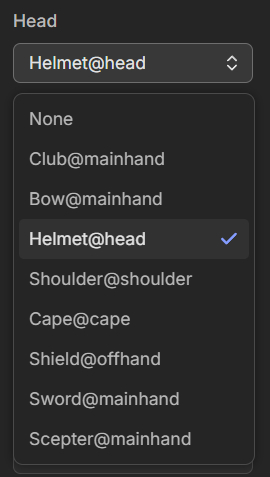
The built-in fields.relationship works, but it only displays item IDs as labels - not helpful when managing dozens of items. I created a custom component that:
- Loads all items using
getCollection() - Creates human-readable labels (item name + slot type)
- Validates that items match their slot (no swords as helmets)
- Renders items visually on top of the character sprite for instant feedback
const items = await getCollection('items');

const itemsOptions = items.map(item => ({
  label: item.id !== '0'
    ? `${item.data.name}@${item.data.slot}`
    : 'None',
  value: item.id
}));

const selectItems = ({label}: {label: string}) => ({
  ...fields.select({
    label,
    options: itemsOptions,
    defaultValue: '0'
  }),
  serialize(value: string) {
    return { value };
  },
});
This approach gives me control over how options render and allows filtering based on game logic - e.g., only showing helmets for the "Head" slot.
What I Built
Visual Validation in Keystatic
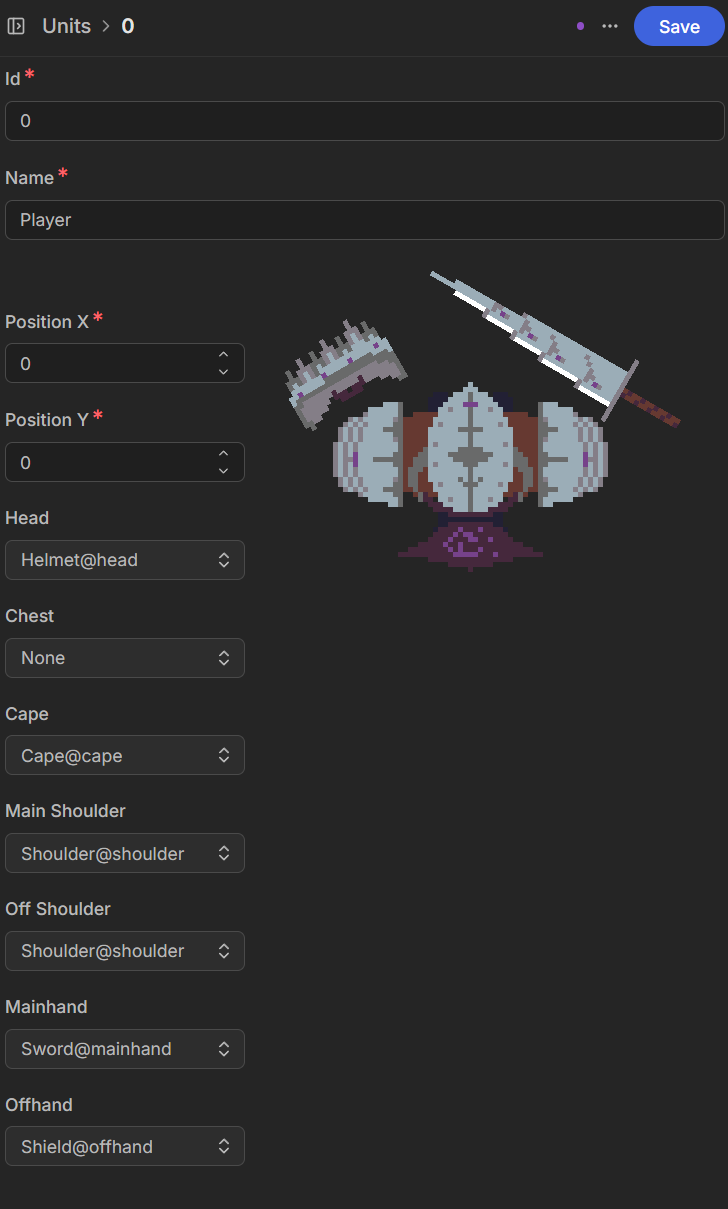
Here's what it looks like when editing a unit in Keystatic:
The key innovation is a custom React component that renders the character sprite with equipped items overlaid on top. This gives instant visual feedback - you can see immediately if items are equipped correctly or if there's a mismatch.
Custom Component Implementation
import { getCollection } from "astro:content";

const items = await getCollection("items");

const UnitFieldInput = ({ schema, fields }) => {
  const sprite = items
    .find(
      item => item.id === fields.mainhand.value
    )
    .data.sprite;
  return (
    <div>
      {Object.values(fields)
        .map(
          Field => <Field.schema.Input {...Field} {...Field.schema} />
        )
      }
      <div style={{
        backgroundImage: 'url(/units.png)',
        backgroundPosition: `${-fields.x.value}px ${fields.y.value}px`,
      }} />
      <div style={{
        position: "absolute",
        width: sprite.width,
        height: sprite.height,
        backgroundImage: 'url(/items.png)',
        backgroundPosition: `${-sprite.x}px ${sprite.y}px`,
      }} />
    </div>
  );
};
This component fetches item data and renders them directly on the character. Everything needed for creating new game content is there in one place.
Generated Output
Keystatic outputs clean JSON files that C++ can consume directly:
// src/content/units/0.json
{
  "name": "Player",
  "unit": {
    "x": 0,
    "y": 0,
    "head": 3,
    "chest": 0,
    "cape": 5,
    "mainShoulder": 4,
    "offShoulder": 4,
    "mainhand": 8,
    "offhand": 6
  }
}
I parse this using nlohmann::json in C++. Each item ID maps to item data and sprite coordinates in the renderer.
Reflections
What surprised me most was the speed. Setting up Astro, Keystatic, creating schemas, and building a custom component took one day of free time.
If I'd tried to bind to Godot or build custom editor tooling, I'd still be working on it weeks later. Instead, I leveraged:
- My existing knowledge of React and TypeScript
- Keystatic's schema system for instant validation and visual feedback
- Astro's collection system for type-safe data
Beyond this game project, that same Keystatic instance could become:
- An asset management interface
- A tool for non-technical team members to manage game content
- A wiki for community (Thanks Bartosz for that idea)
This is the real win: using web tools doesn't lock you into one use case. A weekend proof of concept today could become your team's centralised content hub tomorrow.
More to learn
See the full code example for the complete implementation.
Additional materials
Unity - Game architecture with ScriptableObject (1h)
Godot - Custom resources for global state management (7m)